Build a configuration before hardware arrives: create a project, reopen an XML file or merge several projects, then prepare names and subscriptions.
 SiLeMI/O
DANTE · Dante patching · offline, local network and mixed mode
Dante Config Editor
Dante patching, from project to network.
Prepare without hardware. Patch available devices. Keep project and network in one grid.
On Windows, Dante Config Editor is an alternative to Dante Controller for the supported audio patching and preparation workflows. Start from scratch, open or merge XML projects, then batch rename devices and channels while preserving recognised subscriptions. Work directly with devices detected on the local network, or keep missing devices alongside them in the same grid. Patches between available devices apply directly; comparison and synchronisation remain separate choices. On Mac, this release offers the offline XML workspace, without the integrated network grid or mixed mode.
STANDALONEWindows: offline preparation, direct network patching or mixed work. macOS: offline XML project creation, merging and editing.
Dante patching · offline, local network and mixed mode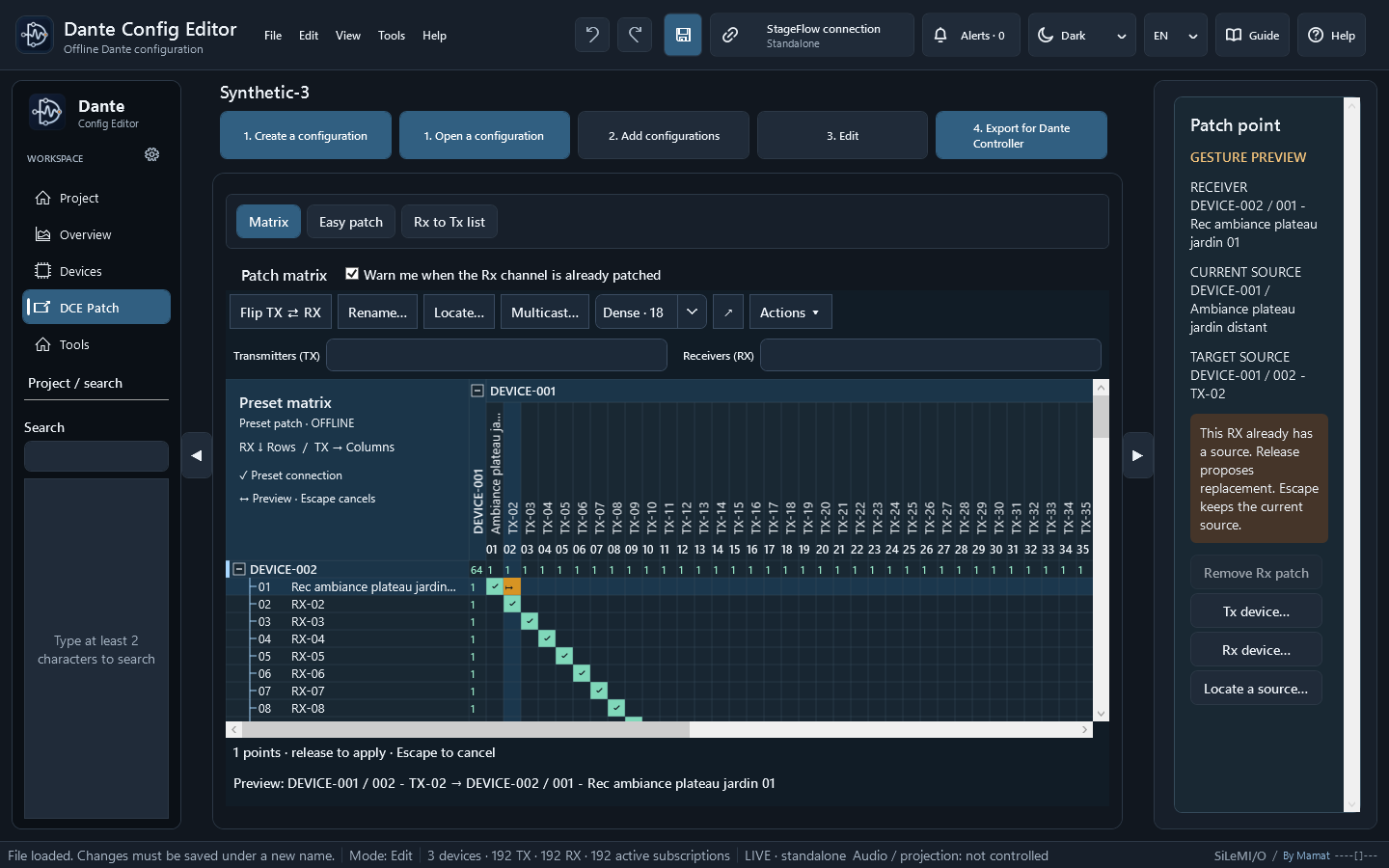
v2027.3.0Stable public release
VERSIONv2027.3.0
PLATFORMSWindows — x64 · macOS — Apple Silicon · macOS 15+ · macOS — Intel · macOS 15+
RELEASEStable public release
In the field
Practical uses in the field.
On Windows, find available TX sources and RX destinations, apply an audio patch directly on the network and choose unicast or multicast where the device supports it.
On Windows, work with an incomplete inventory: keep missing devices in grey, prepare their routes and compare or synchronise only selected differences.
ONE DANTE WORKSPACE · FROM FILE TO NETWORK
A flexible project. A patch under your control.
DCE brings XML preparation together with local network patching on Windows. Move forward before, during and after devices are installed, without requiring a global synchronisation just to change one route.
Create, open or merge
Start from scratch with the device bank, reopen an XML file or combine several projects. Name and technical identity conflicts are flagged before merging.
Patch directly · Windows
Devices detected on the local network appear in the TX/RX grid. Apply a route between available devices without synchronising the whole project first.
Work in mixed mode · Windows
Planned but missing devices remain visible in grey. Prepare their routes while continuing to patch available hardware.
Rename without starting over
Batch rename devices, TX and RX channels, including numerical suffixes and stereo pairs. DCE preserves recognised subscriptions when the operation supports it.
Find every source and destination
Start from an RX to identify its source or from a TX to see its destinations. Separate filters, patch point details, Flip, zoom and a detachable grid help with large patches.
Compare and apply only what fits
Review differences between project and network, choose devices, settings and transfer direction, then synchronise on request. Audits also flag inconsistent configurations.
How it works
Prepare, adjust, use.
Prepare offline
Create or open a Dante XML file, add device profiles, rename channels and prepare the patch. Available on Windows and Mac.
Open the network grid
On Windows, show detected devices, their TX/RX channels and subscriptions alongside the project.
Work in mixed mode
On Windows, keep project devices missing from the network visible in grey and patch directly between available devices.
Compare on request
Choose when to compare or synchronise differences between the project and present devices, and in which direction.
Save and hand over
Save the XML project and its documentation, then verify the configuration and patch on the hardware before use.
Inside the software
Real screens. Concrete uses.
Enlarge ↗Matrix with separate TX and RX filters, green connections and an orange preview. Patch point details show the receiver, its current source and the intended source. Test capture with fictional data.
Key features
What you can do.
01
Build an installation from scratch with reusable profiles from built-in or personal device banks, or open an existing XML file directly.
02
Merge several XML files while detecting conflicting names and technical identities, then rename automatically or manually.
03
Open a Dante XML directly or drop several XML files into the window; open separately or add to the project without merging incompatible XML versions.
04
Add and structurally validate the generic audio roles CL3 64×64, QL5 64×64, HY144-D 144×144 and RU-LB4 4×4, with no hardware identities or production data.
05
The 2026.3.1 community bank contains 80 models; verify the selected profiles on Dante hardware before use.
06
Prepare offline on Windows and Mac using the matrix, Easy Patch, drag and drop, ranges and 1:1 series.
07
On Windows, show the open XML project and Dante devices detected on the local network in one grid; missing devices remain visible in grey.
08
On Windows, patch directly between available devices from the grid without requiring prior project synchronisation.
09
On Windows, compare differences and synchronise selected devices or settings only on request, choosing the direction of transfer.
10
On Windows, navigate subscriptions from a TX or RX, filter both sides separately and choose unicast or multicast where the device supports it.
11
Rename devices, RX and TX channels in series, including numerical suffixes and stereo pairs, while preserving recognised subscriptions.
12
Apply a profile or global action to a selection or every compatible, unlocked device.
13
Edit latency, sample rate, encoding, Preferred Master, IP addressing and Redundant or Daisychain mode when the XML role exposes those properties.
14
Audit inconsistencies and audio-format or network differences, then navigate directly to the affected items.
15
Find an RX source or every destination of a TX in the matrix; Flip swaps the devices in the selected block without moving the TX/RX axes, with two-finger scrolling and pinch zoom.
16
Filter TX and RX devices and channels separately; before confirming a patch, inspect the receiver, its current source and the intended source for that gesture.
17
Read a .stageflow file on Windows or Mac, choose the entries and destination RX range, then review labels before applying them.
18
Preserve synoptic locations, ordering, visibility, and manual positions inside a StageFlow project without adding those workspace data to exported Dante XML.
19
In Easy Patch, select one or more Tx channels and drop them on the first Rx to create an immediate sequential assignment, with one source per Rx.
20
In the opposite direction, select one or more Rx channels and drop them on the first Tx to feed those Rx channels from consecutive Tx channels.
21
On Mac, prepare XML projects offline with Easy Patch from Tx or Rx channels; enable an optional warning before replacing a connection.
22
On Mac, use Command-click for blocks of 16 and create L/R stereo sequences with or without spaces.
23
On Mac, remove Rx or Tx connections from a device’s detail panel after confirmation.
24
On Windows, use Easy Patch from sources or destinations and Ctrl-click to patch or unpatch 1:1 groups; an optional warning can flag replacements.
25
On Windows, create L/R stereo sequences with or without spaces, choose the transport by right-clicking and view the Rx signal indicator when a measurement is available.
26
On Windows, unpatch a device after confirmation.
27
Voluntarily join a StageFlow LIVE session: after linking entries to RX channels, labels can follow patch changes on linked RX channels only. This StageFlow synchronisation concerns project labels; it is separate from direct network patching available on Windows.
28
In the project matrix, expand only the devices you need, draw a diagonal or column automatically with a live preview, rename a label by double-clicking and extend a series with its fill handle.
29
Create, update or delete simple Dante audio multicast flows in 3.0.0 presets while preserving unknown formats unchanged.
30
Keep references to Tx channels missing from a partial preset as information, preserving those subscriptions instead of treating them as blocking XML errors.
31
Deliver before/after comparisons, reports, patchbooks and PDF or SVG synoptics to document the project and the work carried out.
32
Respect hardware limits: a global action skips roles that do not expose the requested property and reports excluded devices instead of inventing an XML setting.
Pricing and licence
€49 incl. taxPermanent licence · one-time payment
Stripe purchase availableTry every feature for 30 days from the first launch of version 2027.3, with no code required. A €49 permanent licence is then required to continue using Dante Config Editor. Previously purchased and complimentary licences remain valid.
- Full 30-day trial from the first launch of 2027.3, including for users of the previous free version; no code is required for the trial.
- After the trial, purchasing and activating a licence and saving the draft remain available.
- One-time purchase, with three activations by default; previously issued codes remain recognised.
- New licence codes require a connection for activation; authorised use can then continue offline.
- On Mac starting with version 2027.2.10 (macOS 15 or later), V2 licence codes are supported. An internet connection is needed to activate or deactivate a licence.
Download DANTE
v2027.3.0
DOWNLOADWindows installer — x64v2027.3.0 · EXE · 103 MB · November 12, 2026DOWNLOADmacOS installer — Apple Siliconv2027.3.0 · DMG · 82.9 MB · November 12, 2026 · macOS 15+DOWNLOADmacOS installer — Intelv2027.3.0 · DMG · 84.2 MB · November 12, 2026 · macOS 15+
Dante Config Editor v2027.3.0 is available for Windows and macOS. The matrix separates TX/RX filters and shows the receiver, its current source and the intended source before patching.
Installation and checks — Windows and macOS 2027.3
On Windows, prepare an offline project or connect to the local network to use the network grid.
On macOS 15+, use the offline XML workspace with the package for your processor.
Verify the project and routes on the hardware before use.
DCE 2027.3 release notes and qualificationDownload guides and manuals
DOWNLOADSHA-256 checksums — Windowsv2027.3.0 · 0.1 KBDOWNLOADSHA-256 checksums — macOSv2027.3.0 · 0.1 KBDOWNLOADSHA-256 checksums — macOSv2027.3.0 · 0.1 KBDOWNLOADIllustrated suite guide FRPDF · edition 2027.3 · 0.4 MBDOWNLOADComplete manual EN — WindowsGuide reference: v2027.3.0 · PDF · 2.9 MBDOWNLOADComplete manual FR — WindowsGuide reference: v2027.3.0 · PDF · 3 MBDOWNLOADComplete manual EN — macOSGuide reference: v2027.3.0 · PDF · 1.2 MBDOWNLOADComplete manual FR — macOSGuide reference: v2027.3.0 · PDF · 1.2 MBDOWNLOADValidation scope and limits — Windowsv2027.3.0 · MD · 1 KBDOWNLOADQuick start EN — WindowsGuide reference: v2027.3.0 · PDF · 133.5 KBDOWNLOADQuick start FR — WindowsGuide reference: v2027.3.0 · PDF · 134.5 KBDOWNLOADQuick start EN — macOSGuide reference: v2027.3.0 · PDF · 132.3 KBDOWNLOADQuick start FR — macOSGuide reference: v2027.3.0 · PDF · 133.3 KBDOWNLOADRelease notes FR/EN — Windowsv2027.3.0 · MD · 2.8 KBDOWNLOADRelease notes FR/EN — Windowsv2027.3.0 · MD · 2.5 KBDOWNLOADSHA-256 checksums — Windowsv2027.3.0 · TXT · 0.1 KBDOWNLOADIllustrated suite guide ENPDF · edition 2027.3 · 0.4 MB
Download cumulative release notes ↓
Open the complete release page Recent versions first · French and English when available. The file shows the last successful check; a labelled backup is provided if the source is unavailable.
VIDEO PRESENTATION
See the software in action.
Dante Config Editor 2027.3 — from project to network
Explore project creation, XML merging, renaming, mixed mode and the network diagram in DCE on Windows. Network operation is simulated using a fictional project.
Silent demonstration · DCE Windows 2027.3 · fictional project · simulated network
Open the video Download transcript