Build a complete patch, organise common lines and groups, then print one clear A4 sheet for each team.
 SiLeMI/O
FLOW · Patch, plans and orchestration
StageFlow
The shared technical project for the whole team.
StageFlow keeps the stage patch, working groups, printable sheets and plan inside one .stageflow project. That project becomes the suite’s master session: StageDesk converts it for consoles and software, StageMark follows the plan and projects markers, StageMon builds monitor buses and Dante Config Editor reuses useful Dante data. The supplied AutoCAD plug-in retrieves project sources directly so they can be positioned precisely on the plan. Every tool remains standalone but can join the LIVE session to follow project updates in real time. Alerts flag source-label changes, with independent acknowledgement on each station.
STANDALONEOn its own, StageFlow builds and organises the patch, draws the plan and produces sheets ready to print.
Patch, plans and orchestration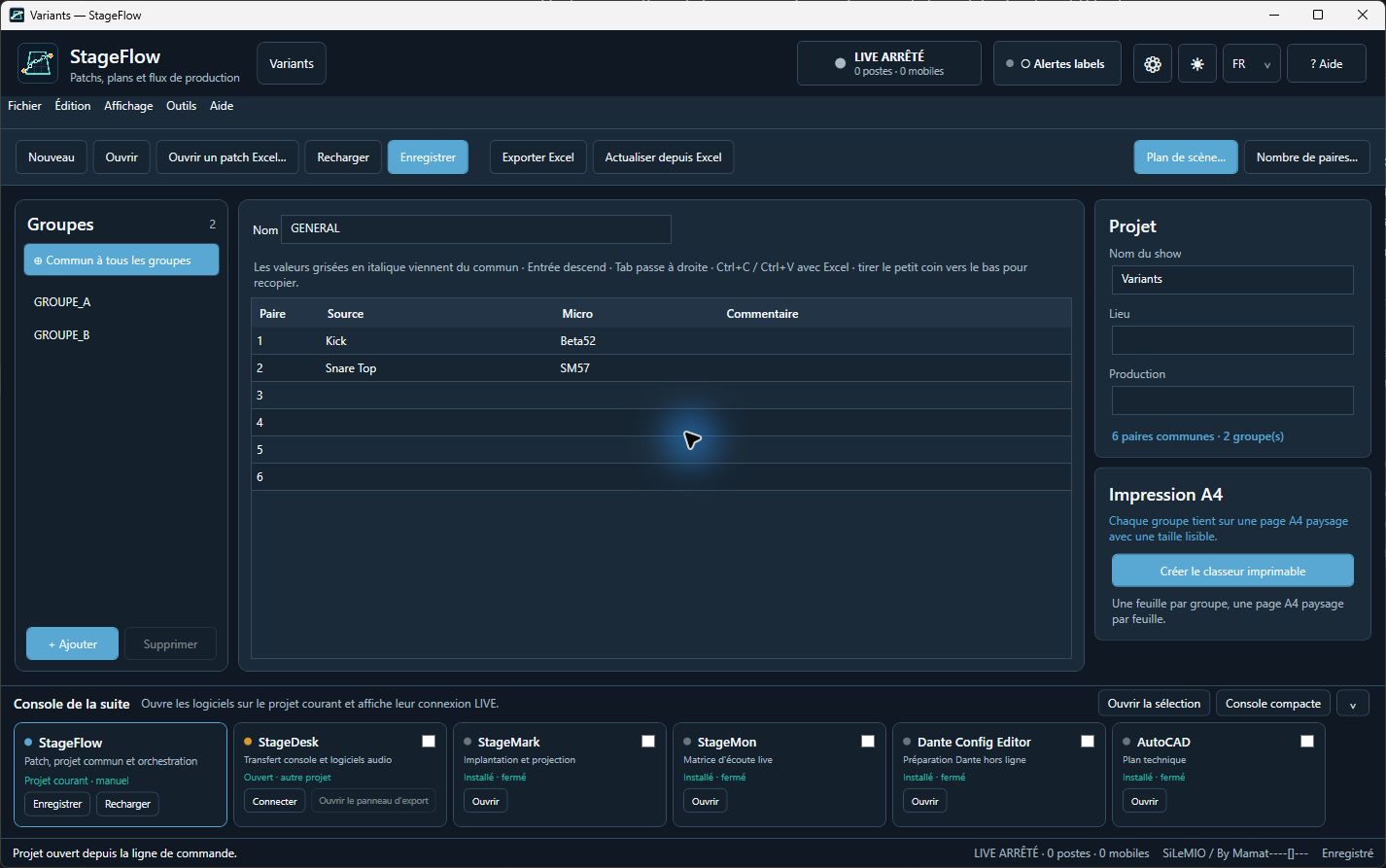
v2027.1.1Free public release
VERSIONv2027.1.1
PLATFORMSWindows — x64 · macOS — Apple Silicon · macOS — Intel
RELEASEFree public release
In the field
Practical uses in the field.
Send the same information in real time to StageDesk, StageMark, StageMon and Dante Config Editor, with alerts when source labels change.
Retrieve sources through the supplied AutoCAD plug-in, position them precisely on the plan and follow project updates.
Use StageMark with a suitable video projector to display the show’s plans and markers directly on the stage floor.
How it works
Prepare, adjust, use.
Build the patch
Enter sources, microphones, notes, common pairs and groups in a spreadsheet-style grid.
Prepare the stage
Export to Excel, produce one A4 sheet per group and retrieve all sources in AutoCAD through the supplied plug-in.
Orchestrate LIVE
Software join the master session, follow project updates in real time and display source-label change alerts.
Inside the software
Real screens. Concrete uses.
Enlarge ↗Sources, microphones, notes and groups become the shared reference for the show.
 Enlarge ↗
Every team sees its useful lines while common values stay synchronised.
 Enlarge ↗
A sample patch exported by StageFlow: sources, microphones and soundcheck times on one A4 page per group.
 Enlarge ↗
Sources are positioned on the plan and remain available to the supplied AutoCAD connector.
 Enlarge ↗
The local portal lets you view and control StageFlow from a phone with no cloud account.
 Enlarge ↗
Several local-network controllers share the same session and see updates in real time.
Key features
What you can do.
01
Freely sized patch, common pairs, groups and per-pair visibility.
02
Fast entry, Excel copy and paste, fill-down and XLSX import/export.
03
One printable landscape A4 sheet per group.
04
Simple stage-plan editor and supplied AutoCAD 2026 plug-in for retrieving and precisely positioning sources on the plan.
05
Native .stageflow project shared with StageDesk, StageMark, StageMon and Dante Config Editor.
06
Network LIVE session with voluntary six-digit-code pairing, a connected-workstation list and manual disconnection.
07
Source-label alerts show previous and new values, origin and time. Each LIVE client receives them by default and acknowledges them locally; reception can be switched off independently, with no replay of missed alerts.
08
The host can pause alerts for the whole session without stopping LIVE. This is separate from each client’s reception and acknowledgement controls.
09
Alerts cover source labels only: microphones, notes, groups, soundcheck times, common pairs and other settings do not trigger these notifications.
10
Access local controls from a phone, tablet or another computer on the same network.
11
OSC control centre, MIDI learn and a Stream Deck plugin for StageFlow, StageMark and StageMon.
12
One starting point for console conversion, Dante preparation, projection and monitoring.
Ecosystem and compatibility
Tools, systems and formats that work together.
Every tool remains fully usable on its own. When it joins the LIVE session, StageFlow sends the shared project, its updates and source-label change alerts.
Audio preparation
The patch becomes available to conversion and network-preparation tools.
- StageDesk
- Dante Config Editor
- Excel / XLSX
Stage and operation
The same sources feed placement, projection, monitoring and the AutoCAD plan.
- StageMark
- StageMon
- Plug-in AutoCAD 2026
LIVE session
A local folder keeps the show information together, shares project updates and flags source-label changes.
- .stageflow
- Patch JSON
- SVG / CAD plan
- Label alerts
Pricing and licence
€0 incl. taxThe heart of the suite stays open to everyone
No purchase requiredStageFlow is free, with no account or subscription. It works by itself and the local .stageflow project can be opened by the other suite tools.
- No payment or activation.
- Local, offline operation.
- French and English interface.
- Optional AutoCAD connector included in the Windows installer.
Download FLOW
v2027.1.1
StageFlow v2027.1.1 is available for Windows x64 and macOS Apple Silicon / Intel. The remote now adopts the revision confirmed after each patch edit, and consecutive phone or tablet changes no longer cause false conflicts. If a genuine concurrent edit occurs, entered text is preserved and refreshing the patch remains explicit. The optional AutoCAD connector is still limited to AutoCAD 2026 on Windows. The DMGs are neither Apple Developer ID signed nor notarized, so macOS may display a warning at first launch.
Mac installation and validation notes
Choose the DMG that matches your Mac, then drag StageFlow into Applications. On some Intel Macs, the first window may take about ten seconds to appear.
The shared Stream Deck plugin and the French and English guides are available below. AutoCAD remains available only with the Windows version.
Software tests do not replace on-site validation of MIDI, Stream Deck, audio and projection hardware. If macOS blocks the first launch, use only the authorised process in Privacy & Security without disabling its global protections.
Current release notesDOWNLOADWindows installer — x64v2027.1.1 · EXE · 60.6 MB · September 24, 2026DOWNLOADmacOS installer — Apple Siliconv2027.1.1 · DMG · 67.3 MB · September 24, 2026DOWNLOADmacOS installer — Intelv2027.1.1 · DMG · 68.5 MB · September 24, 2026
Download guides and manuals
DOWNLOADComplete manual EN — Windows / macOSv2027.1.0 · PDF · 0.2 MBDOWNLOADComplete manual FR — Windows / macOSv2027.1.0 · PDF · 0.2 MBDOWNLOADIllustrated suite guide FRPDF · edition 2027.3 · 0.4 MBDOWNLOADPlugin Stream Deck — Windows / macOSv2027.1.0 · 0.1 MBDOWNLOADIllustrated suite guide ENPDF · edition 2027.3 · 0.4 MBDOWNLOADRelease notes FR/ENMD · 0.7 KBDOWNLOADPopulated patch example — ExcelEditable XLSX · fictional Horizon Live showDOWNLOADPopulated patch example — PDFOne landscape A4 page ready to print
VIDEO PRESENTATION
See the software in action.
StageFlow — prepare and share the patch
Create the patch, prepare printable Excel sheets and access the shared project on your phone and tablet.
No audio track · captions embedded in the picture · downloadable transcript.
Open the video Download transcript